
AI agents are increasingly interacting with websites on behalf of users. Whether it's booking appointments, comparing products, searching documentation, or completing workflows, agents need a reliable way to understand and interact with web applications.
Traditionally, AI agents have relied on browser automation tools that inspect the DOM, click buttons, and fill forms much like a human user would.
WebMCP introduces a different approach. Instead of forcing AI agents to reverse-engineer your website's interface, WebMCP allows websites to expose structured tools that agents can discover and use directly.
This guide explains what WebMCP is, what advantages it has over agents interacting normally with the page content, and how to implement and validate WebMCP on your website.
Understanding these concepts can help make your website more accessible to the next generation of AI-powered tools.
What is WebMCP?
WebMCP is a specification that allows websites to expose capabilities to AI agents using the Model Context Protocol (MCP).
Instead of relying solely on HTML, JavaScript, and browser interactions, websites can publish machine-readable descriptions of actions that agents can perform such as:
- Searching products
- Booking appointments
- Looking up documentation
- Submitting forms
- Accessing account information
Rather than asking an AI agent to figure out which button to click, the website explicitly declares:
"Here are the actions available on this page and how to use them."
This makes interactions more reliable and easier for agents to understand.
Chrome is only just starting to add support for WebMCP. Browsers also don't always provide the AI agent features necessary to use the WebMCP tools. So overall, WebMCP is still in the early stages of development.
Why browser automation doesn't scale well
Today many AI agents interact with websites using browser automation. The process usually looks like this:
- Load page
- Parse DOM
- Identify buttons and inputs
- Simulate clicks and typing
- Wait for page updates
- Continue workflow
While powerful, this approach has a few limitations.
User interface changes break agents
Small UI updates can unexpectedly break workflows.
For example:
- Button labels change
- Forms move location
- Dynamic content loads differently
- CSS selectors become invalid
A human user can adapt instantly. An automated agent often cannot.
Browser automation is expensive
Agents frequently need to:
- Run JavaScript-based rendering logic
- Download assets
- Wait for network requests
- Analyze large DOM trees
This increases latency, CPU usage, and infrastructure costs. For complex applications, this overhead can be significant.
Ambiguity creates errors
A page may contain multiple buttons like "Buy now", "Add to cart", or "Subscribe". An agent must infer intent from the interface and sometimes it guesses incorrectly. WebMCP reduces this ambiguity by providing structured actions.
How WebMCP works
At a high level, WebMCP allows websites to publish tools that AI agents can discover. Instead of interacting with the page visually, the agent interacts with declared capabilities.
A simplified example might look like:
{
  "name": "searchProducts",
  "description": "Search products in the catalog",
  "parameters": {
    "query": {
      "type": "string"
    }
  }
}
An AI agent can immediately understand what the tool does, which parameters it accepts, and how to invoke it. No DOM inspection required.
How to implement WebMCP
WebMCP currently provides two approaches: a Declarative or an Imperative API.
Declarative API
One of the most interesting aspects of WebMCP is that it embraces a declarative approach. Instead of writing JavaScript, developers can expose tools directly through HTML. To turn a form into a WebMCP tool, add the following attributes:
| Attribute | Required | Description |
|---|---|---|
toolname | Yes | Unique name of the tool |
tooldescription | Yes | Human-readable description of the tool |
toolautosubmit | No | Automatically submit after an agent fills the form |
For example:
<form
  id="login-form"
  toolname="login"
  tooldescription="Log in to the application with email and password"
  toolautosubmit="true"
>
  <label for="email">Email</label>

  <input
    type="email"
    id="email"
    name="email"
    required
    toolparamtitle="Email"
    toolparamdescription="User email address"
  />

  <button type="submit">Sign In</button>
</form>
One of the biggest challenges with browser automation is that agents must infer intent from HTML structure. WebMCP allows developers to explicitly communicate that intent.
Rather than guessing that an email field represents a login workflow, the website can declare it directly. This reduces ambiguity and improves reliability.
Once a page exposes a declarative WebMCP tool, a browser agent can discover it from the active tab and understand which inputs it needs to provide. This makes HTML forms a particularly simple way to expose existing website workflows to AI agents.
Imperative API
For more advanced use cases, WebMCP provides a JavaScript API. Tools can be registered dynamically using navigator.modelContext.registerTool(...).
This approach is useful when tools depend on runtime state, parameters change dynamically, or tools are generated programmatically.
Let's take a look at a simplified example:
navigator.modelContext.registerTool({
  name: "search-products",
  description: "Search products in the catalog",

  parameters: {
    query: {
      type: "string",
    },
  },

  async execute({ query }) {
    return searchProducts(query);
  },
});
When an AI agent invokes the tool, the execute callback runs and returns the result. Unlike the declarative approach, the tool does not need to be tied to an existing form or UI element.
This is especially useful when the tool does not map neatly to a single form or when the result depends on runtime application state. Once registered, the tool becomes available to compatible agents operating in the context of that page.
How to connect an agent to a WebMCP site
If you're familiar with MCP servers, this is the part that can feel confusing at first.
With a traditional MCP server, an AI client connects to a standalone service endpoint. WebMCP works differently: the tools are registered by the website itself and discovered from the active browser tab.
In practice, using WebMCP usually looks like this:
- Open a WebMCP-enabled site in a browser that supports WebMCP.
- Make sure the site registers tools using the declarative or imperative API.
- Use a browser-integrated AI agent or a testing tool that can inspect the page's registered WebMCP tools.
- Ask the agent to perform a task on the open website.
- The agent discovers the tools available in that tab and invokes the appropriate one.
So the "connection" is not usually between your agent and a remote server URL. Instead, the agent operates in the context of a live browser tab and uses the tools that the website exposes there.
Declarative vs browser automation
WebMCP represents a declarative approach. Instead of describing how to perform a task, the website describes what capabilities are available.
Let's compare the two models.
| Browser Automation | WebMCP |
|---|---|
| Reads DOM | Reads tool definitions |
| Simulates clicks | Invokes tools |
| Sensitive to UI changes | Stable API surface |
| Requires rendering | Structured interface |
| Higher latency | Lower overhead |
| More ambiguity | Explicit actions |
This doesn't mean browser automation disappears. Many real-world agents will likely use a hybrid approach where you use WebMCP when available and browser automation as a fallback. However, WebMCP can dramatically improve reliability for common workflows.
MCP servers vs WebMCP
At first glance, MCP servers and WebMCP may seem similar. Both are based on the Model Context Protocol and allow AI agents to access structured capabilities.
However, they solve different problems.
An MCP server is a standalone service that exposes tools, resources, and prompts to AI clients. It can connect to internal company knowledge bases, databases, file systems, customer support platforms, and many more. An AI assistant connects directly to the MCP server and can invoke the available tools. The server acts as an integration layer between AI models and external systems.
WebMCP applies similar ideas to public websites. Instead of exposing capabilities through a separate MCP server, the website itself declares actions that AI agents can discover and use. It could search products, book appointments, request quotes, browse documentation, or submit forms. The goal is to make websites easier for AI agents to understand and interact with without relying entirely on browser automation.
You can think of WebMCP as SEO for AI agents, while MCP servers are APIs for AI applications.
Can I use both? You might ask, and the answer is yes, absolutely!
A company might expose an MCP server for authenticated business operations, and WebMCP for public website interactions.
The biggest practical difference is how the agent accesses the tools.
With an MCP server, the agent connects to a standalone backend service and invokes tools over that server connection.
With WebMCP, the agent discovers tools from a live browser tab while the user is on the website. In other words, WebMCP is less like "connect to this API endpoint" and more like "this page exposes structured actions while it's open in the browser."
Why WebMCP matters for website owners
As AI agents become more common, websites that expose structured capabilities may be easier to use programmatically. This means that by using WebMCP we get:
- Better agent reliability - Actions are explicitly defined so agents spend less time guessing.
- Lower infrastructure costs - Agents may not need to fully render pages for every task which helps reduce network traffic, CPU consumption, and browser automation overhead.
- Improved user experience - Users increasingly expect AI assistants to perform tasks on their behalf. WebMCP can make these interactions smoother and more predictable.
How to test WebMCP during development
After adding WebMCP support to a website, the next step is making sure the tools are actually discoverable and usable. A good development workflow is:
- Open the site in a Chrome environment that supports WebMCP.
- Register one or more tools using the declarative or imperative API.
- Use a WebMCP testing tool or browser debugging workflow to inspect which tools are currently registered on the page.
- Invoke the tool manually with example parameters to confirm that it behaves as expected.
- Run Lighthouse to verify that the tools are discoverable and correctly exposed.
This is an important distinction: Lighthouse helps validate that tools are present and exposed correctly, but it is not the same as testing the full end-to-end agent experience.
Validating WebMCP with Lighthouse and PageSpeed Insights
As WebMCP adoption grows, validation becomes increasingly important. Lighthouse includes audits that can help verify whether WebMCP capabilities are correctly exposed and discoverable.
Common checks include:
- Tool discovery
- Schema validation
- Metadata quality
- Accessibility of declarations
Running Lighthouse during development helps identify implementation issues before deployment.
And recently, PageSpeed Insights (PSI) also added Agentic Browsing audits to validate how accessible a website is for AI agents. This includes a set of WebMCP-specific validation checks.

Enable WebMCP in Chrome
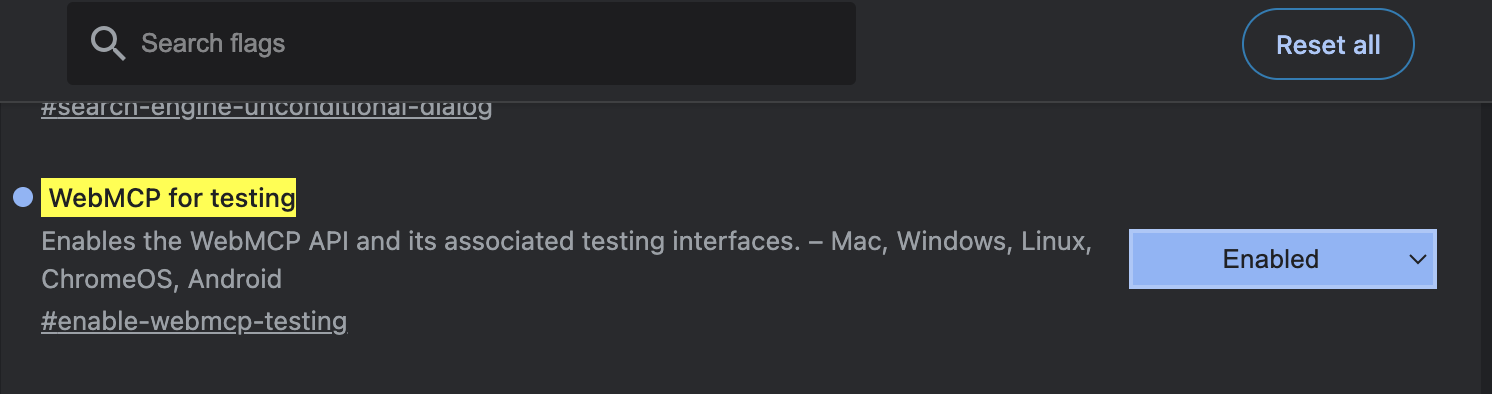
WebMCP is a developing standard, and it's not enabled by default in Chrome.
To do enable it, navigate to chrome://flags/#enable-webmcp-testing and enable the "WebMCP for testing" option:
View WebMCP tools in Chrome DevTools
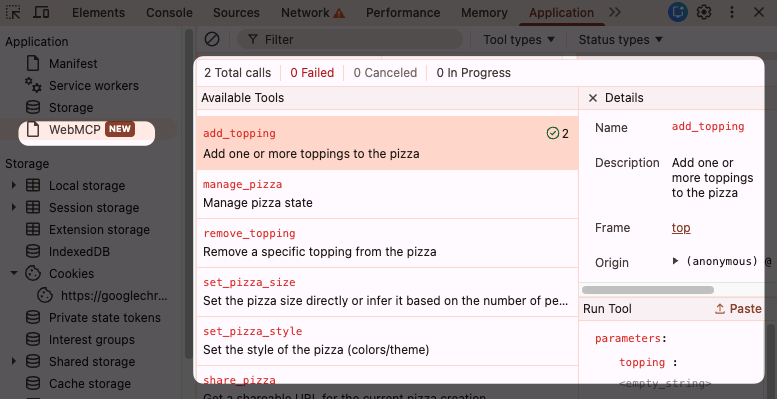
Chrome Canary now includes a new WebMCP section in the Chrome DevTools Application tab.
You can see what tools are provided by the page, what options they take, and run them.
Test WebMCP tools with the Model Context Tool Inspector
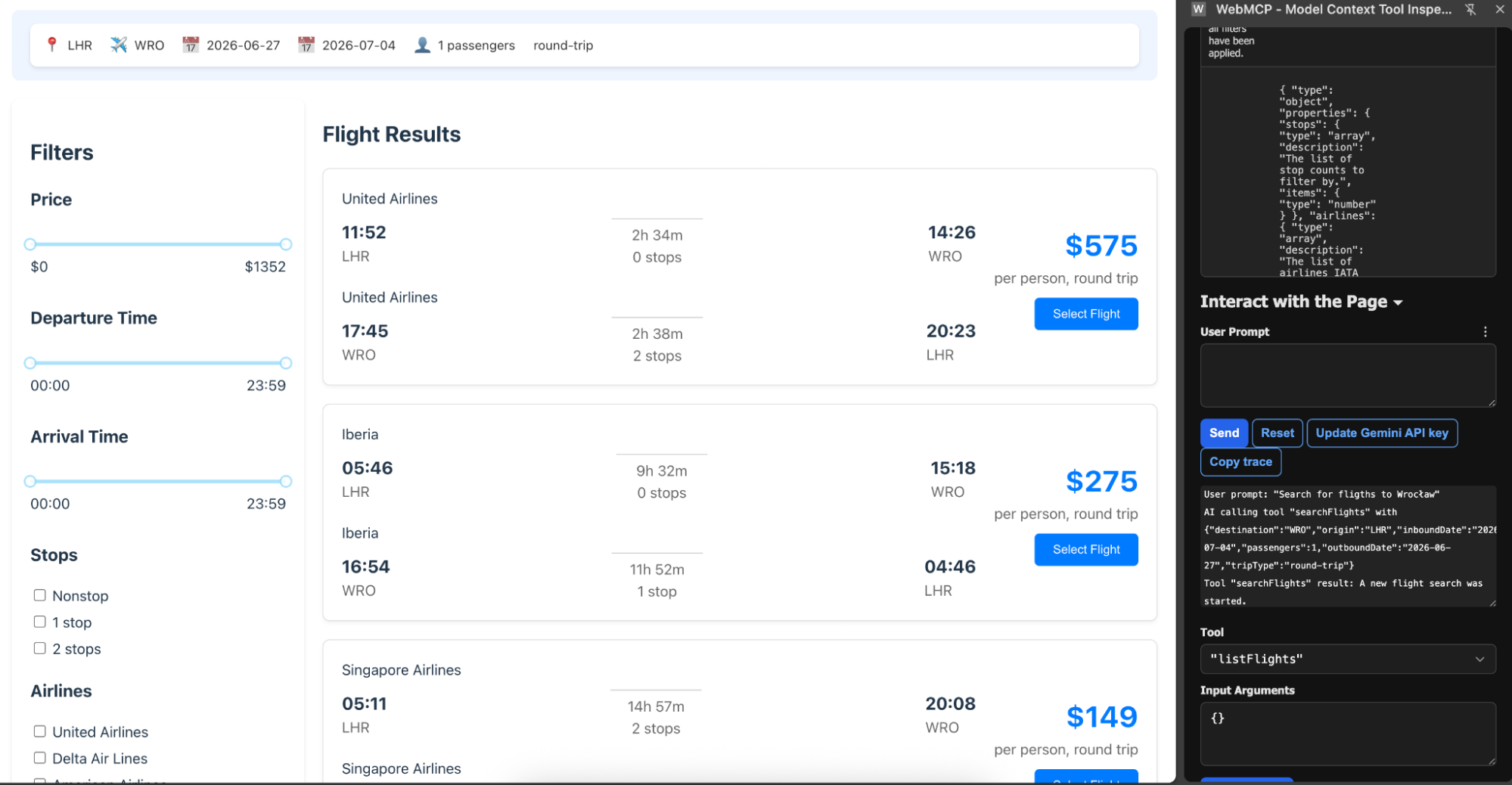
The WebMCP Inspector is a Chrome extension you can use to view WebMCP tools on a website and use them with your Gemini AI agent.
For example, we can use it to inspect a sample project by Google, the React based Flightsearch application. It uses the imperative API that can be inspected here.
When we open the React Flight Search website and expand the WebMCP Tool Inspector extension we should see following result:
As of now, we cannot yet interact with the website by using WebMCP as we need to add a Gemini API key. Once we provide our Gemini API Key, the Send option will be unlocked and then we could send the user prompt like following:

Keep in mind that even the typo flights did not interrupt the model from executing a proper command. And after some time, we will receive result and we will be redirected to a page where we will see flights where the destination was Wrocław:
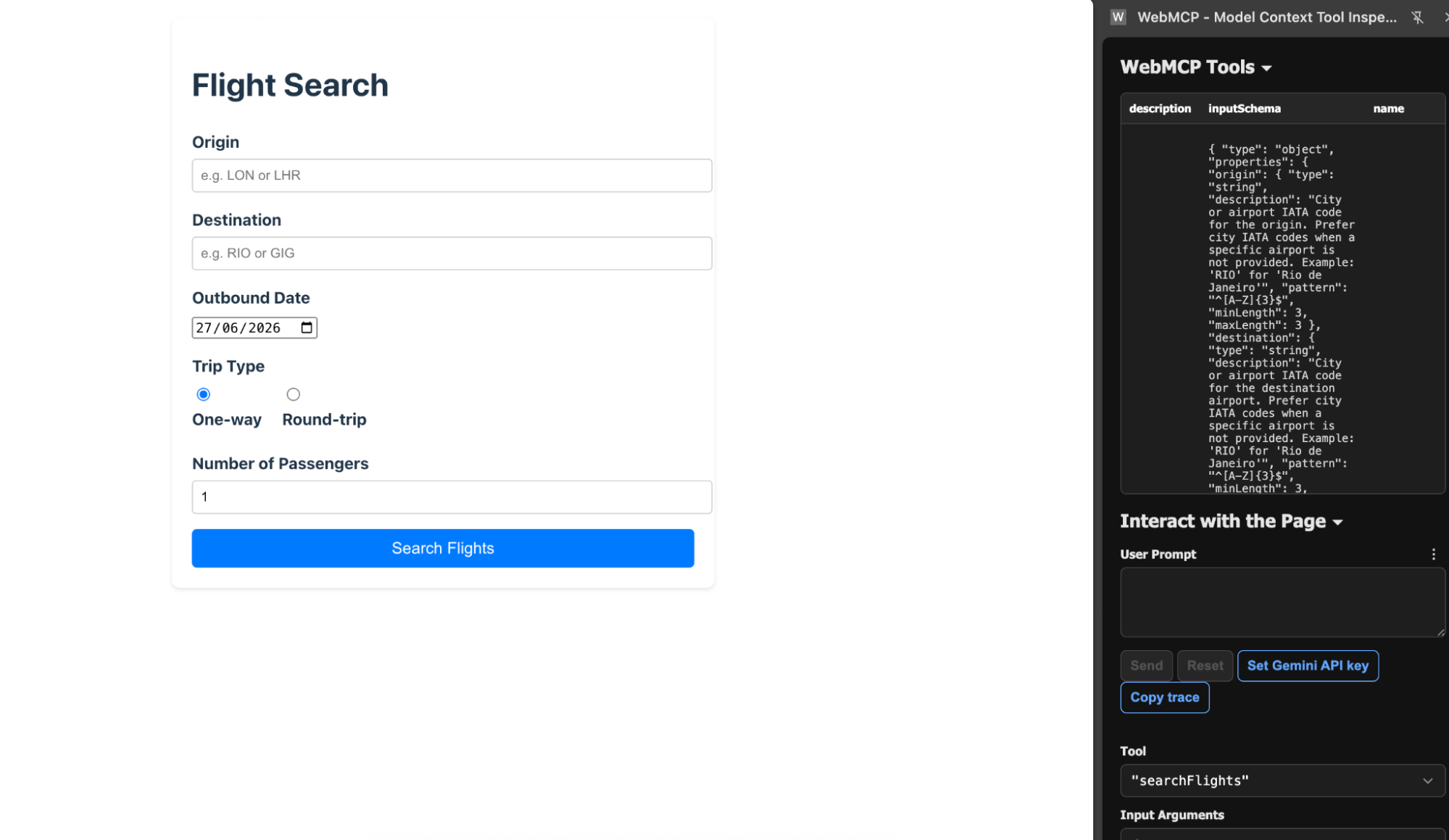
Here, we get access to even more tools like setFilters or listFlights that we can further interact with.
Using DebugBear to monitor WebMCP
DebugBear can run Lighthouse audits automatically as part of your website monitoring workflow. This allows teams to:
- Detect validation failures
- Track Lighthouse scores over time
- Verify WebMCP-related audits after deployments
- Monitor changes continuously
Instead of manually running Lighthouse after every release, DebugBear can help surface regressions automatically. And it also shows the new Agentic Browsing section in Lighthouse:

You can check the full report here.
A particularly useful workflow is combining WebMCP validation with existing performance monitoring, allowing teams to ensure both human users and AI agents can successfully interact with their website.
WebMCP and the future of the web
The web was originally designed for human users. Over time it became accessible to:
- Search engines
- Mobile applications
- APIs
- Automated systems
AI agents represent the next evolution. Rather than interpreting interfaces intended for humans, agents increasingly need structured ways to interact with websites.
WebMCP helps bridge that gap by exposing website capabilities in a format that machines can understand directly.
Summary
WebMCP allows websites to expose structured capabilities to AI agents using the Model Context Protocol.
Compared to traditional browser automation, WebMCP offers:
- More reliable interactions
- Lower overhead
- Reduced ambiguity
- Better resilience to UI changes
While browser automation will remain important, declarative approaches like WebMCP are likely to become increasingly common as AI agents become a larger part of how users interact with the web.
If you want your website to be ready for AI-powered workflows, WebMCP is worth exploring today.
Monitor Page Speed & Core Web Vitals
DebugBear monitoring includes:
- In-depth Page Speed Reports
- Automated Recommendations
- Real User Analytics Data